Creating a PhotoZone Graphy account is free and takes only a few minutes. Whether you are a photographer looking to showcase your work, explore international photography opportunities, connect with other creators, or use our Cloud and Transfer services, you can get started by creating your account.
PhotoZone Graphy offers multiple registration methods, including Google, Discord, and email registration. Choose whichever method is most convenient for you and follow the steps below.
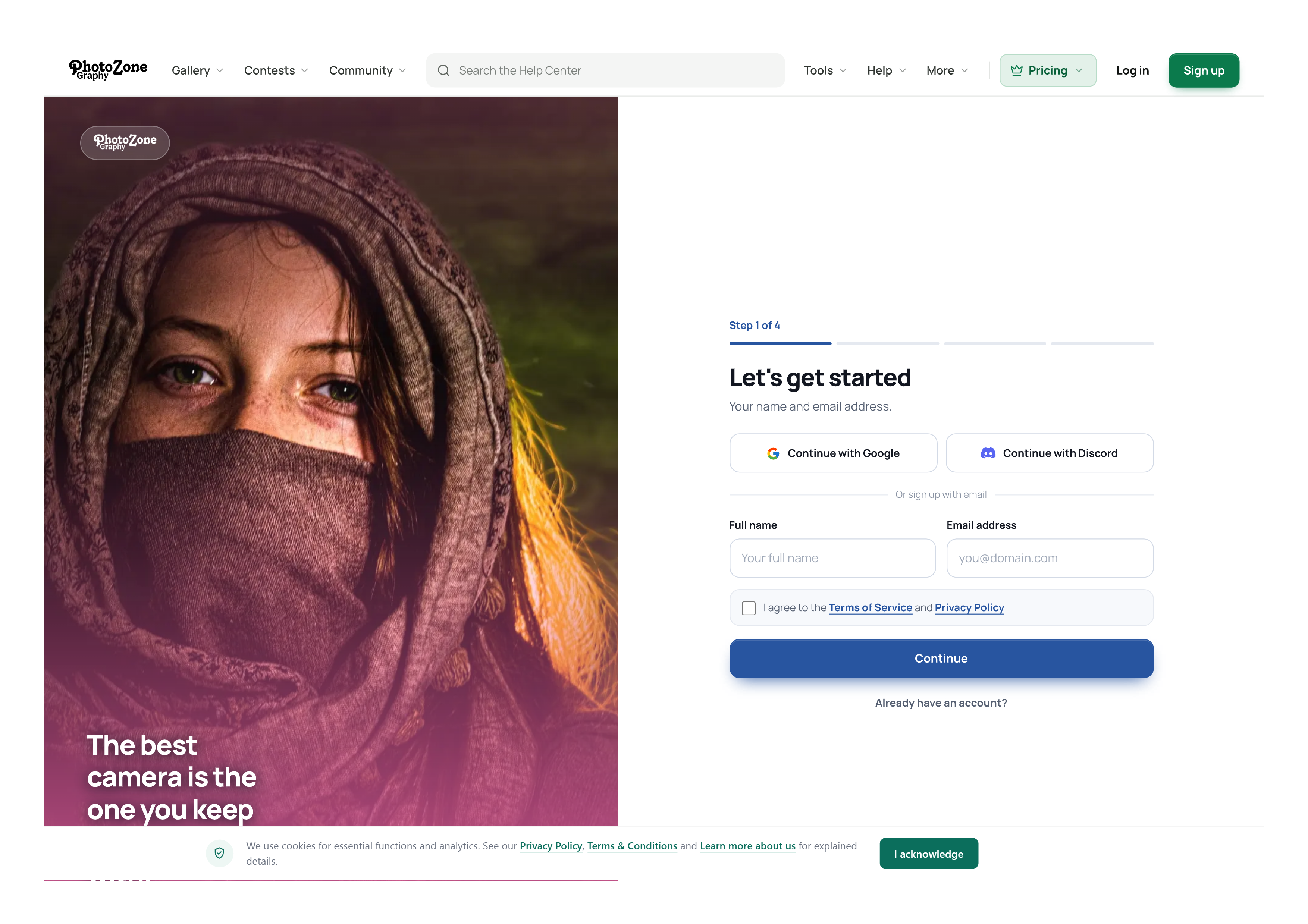
Step 1: Open the Registration Page
There are two ways to access the PhotoZone Graphy registration page:
From the website: Click the Sign Up button available in the website's navbar or sidebar.
Direct link: Visit https://photozonegraphy.com/auth/signup.
You will arrive at the registration welcome page.
Join PhotoZone Graphy
You will see the following introduction:
A growing community of photographers
Create a free account to upload your work, get discovered, and connect with photographers around the world.
Below the introduction, you will find two options:
Continue to sign up: Choose this option if you are creating a new PhotoZone Graphy account.
I already have an account: Choose this only if you have previously registered. It will take you to the login page.
If this is your first time using PhotoZone Graphy, select Continue to sign up.
Step 2: Choose Your Registration Method
The first registration screen will ask for your basic information.
You will see three registration options:
Continue with Google
Continue with Discord
Sign up with email
You can use any of these methods to create your account.
Option A: Continue with Google
<Recommended method>
We recommend Google registration because it is a convenient way to create an account without manually setting up a separate password during registration.
Select Continue with Google.
A Google sign-in window or account selection screen will appear.
Choose the Google account you want to use.
If Google asks you to sign in, enter your Google account credentials.
Review and approve the requested access, if prompted.
You will be redirected to PhotoZone Graphy to continue the registration process.
Your Google account's profile name will be used as your full name on PhotoZone Graphy. Your PhotoZone username will be generated automatically based on your name, although it may differ slightly if the preferred username is already taken or unavailable.
Important: Make sure you select the correct Google account. The account you choose will be associated with your PhotoZone Graphy registration.
Option B: Continue with Discord
You can also register using your Discord account.
Select Continue with Discord.
A Discord authorisation or login screen will appear.
Sign in to Discord if you are not already logged in.
Review the requested account information and authorise the connection if prompted.
After successful authorisation, you will be redirected to PhotoZone Graphy.
Your Discord profile name will be used as your full name during registration. A username will be generated automatically based on your name, and it may be slightly different from your Discord username.
Important: Use the Discord account you intend to associate with your PhotoZone Graphy profile.
Option C: Sign Up with Email
If you prefer to register without connecting a Google or Discord account, you can create your PhotoZone Graphy account using your email address.
On the registration screen, you will find the following fields:
Full name: Enter your real and complete name.
Email address: Enter an active email address that you can access.
You will also need to agree to the Terms of Service and Privacy Policy before proceeding.
After completing the required fields, select Continue.
This method also gives you access to additional account authentication options, including authenticator-code login, backup-code login, and passkey login, where supported.
Which Registration Method Should You Choose?
Both methods allow you to create a PhotoZone Graphy account. However, there are some differences.
Google or Discord: Convenient registration with an existing account and less information to enter manually.
Email: Allows you to establish a separate PhotoZone Graphy login and use additional authentication methods.
If you want the quickest registration experience, we recommend Google sign-up. If you prefer a separate login identity and additional authentication options, email registration is also an excellent choice.
Step 3: Create Your Username and Password
If you choose email registration, the next step will ask you to create your PhotoZone Graphy username and password.
Choosing a username
Your username is your unique identity on PhotoZone Graphy. It may appear on your profile and in other areas of the platform.
Keep the following points in mind:
Your username must use lowercase letters rather than capital letters.
Choose something simple and easy to remember.
Avoid unnecessary numbers or special characters where possible.
Make sure your username represents you professionally, especially if you are a photographer.
Your username is different from your full name. Your full name identifies you, while your username is your unique account identifier.
Creating a strong password
Choose a strong password that is difficult for others to guess.
We recommend:
Using at least 12 characters.
Combining uppercase and lowercase letters, numbers, and symbols.
Avoiding your name, birthday, or other easily guessed information.
Never reusing a password from another website.
Keep your password private and do not share it with anyone.
If you register using Google or Discord, you will not need to create a separate PhotoZone password through this registration step.
Step 4: Verify Your Email Address
For email registration, PhotoZone Graphy will send a One-Time Password (OTP) to the email address you provided.
Open your email inbox.
Find the verification email sent by PhotoZone Graphy.
Copy the OTP provided in the email.
Return to the registration page.
Enter the OTP in the verification field.
Once the OTP is successfully verified, your account registration will be completed.
Having trouble receiving the OTP?
Check your Spam, Junk, or Promotions folder.
Make sure you entered the correct email address.
Wait a little before requesting another code, if the option is available.
Check whether your email provider is blocking or delaying incoming messages.
If you still cannot receive the verification code, contact the PhotoZone Graphy administration team for assistance.
For Google and Discord registration, the identity verification process is generally handled through the respective service. You may not need to complete the separate email OTP step used for email registration.
A Note About Account Security and Passkeys
PhotoZone Graphy supports multiple ways to access and protect your account. Depending on your registration method and available authentication settings, you may be able to use:
Authenticator codes.
Backup codes.
Passkey authentication.
Passkeys provide a convenient and secure way to log in using your device's built-in authentication, such as fingerprint recognition on supported laptops and Android devices or Face ID on supported Apple devices.
Your fingerprint and facial recognition data are not sent to PhotoZone Graphy. Biometric verification takes place on your device. PhotoZone Graphy uses the cryptographic information associated with your passkey to verify your login.
You can learn more about how this works in our dedicated guide:
How Passkey Login Works on PhotoZone Graphy
Step 5: Complete the Reference Questions
After successfully creating your account, you may see a few reference questions.
These questions help us understand how people discover PhotoZone Graphy, what brings new members to the platform, and how our international community is growing.
Completing these questions is optional. You can provide your answers if you wish, but they are not mandatory for creating or using your account.
We encourage you to complete them because your feedback helps us understand our community's growth and improve our services.
Welcome to PhotoZone Graphy!
Once registration is complete, you can start exploring the platform.
Your free account gives you access to PhotoZone Graphy's core community features and services. You can begin building your profile, exploring photography galleries, participating in available opportunities, and discovering the tools offered by the platform.
PhotoZone Cloud – Free Storage Included
Every free account receives 200 MB of PhotoZone Cloud storage to explore the Cloud experience and try its available features.
You can use this space to get familiar with private storage and other supported Cloud features before deciding whether you need more capacity.
If you require additional storage and higher usage limits, you can explore our membership and Cloud plans.
Free, Pro, and Verified Memberships
PhotoZone Graphy offers different membership levels, and available features and usage limits depend on your membership status.
In general:
Free members: Receive access to core platform features and an initial 200 MB of PhotoZone Cloud storage.
Pro members: Receive higher limits and additional benefits across supported services, including Cloud storage, uploads, and selected tools.
Verified members: Receive additional benefits and higher usage limits across eligible platform services.
The exact limits and benefits may vary depending on the service and membership status. You can explore the current plans here:
You do not need to purchase a membership to create an account. You can start with the free account and upgrade whenever you need additional features or capacity.
Frequently Asked Questions
1. Is creating a PhotoZone Graphy account free?
Yes. Creating an account is completely free. You can register using Google, Discord, or your email address without purchasing a membership.
2. Do I need a Google or Discord account to register?
No. You can register directly using your email address. Google and Discord are optional registration methods.
3. Can I use the same email address for multiple accounts?
Your email address is used as an account identifier during registration. If it is already associated with an existing PhotoZone Graphy account, you should log in to that account rather than attempting to create another one with the same address.
4. Can I change my automatically generated username?
Your username is generated during social registration. If you want to change it later, check your available profile or account settings for the username editing option.
5. What should I do if I do not receive the OTP?
First, check your Spam and Junk folders and confirm that your email address is correct. If the OTP still does not arrive, contact our administration team through the official contact page.
6. Do I need to complete the reference questions?
No. They are optional. However, completing them helps us understand how new members discover PhotoZone Graphy and how our community is developing.
7. Do free accounts receive PhotoZone Cloud storage?
Yes. Every free account receives 200 MB of Cloud storage to explore the available features.
8. Can I log in using my fingerprint or Face ID?
Yes, through passkey authentication on supported devices, provided you have configured a passkey for your account. Your biometric information stays on your device and is not shared with PhotoZone Graphy.
9. What if I already have a PhotoZone Graphy account?
Do not create another account. Select I already have an account on the registration welcome page or visit the login page to access your existing account.
Need Help Creating Your Account?
If you experience any difficulty during registration, encounter an error, or cannot verify your email address, please contact our administration team.
We will be happy to help you get started.
Related articles
Was this article helpful?